
-
.png)
YEAR 2 LPUS
Note:
Year 2 SHSS students will NOT be participating in the AY2026S2, 29 Sep to 1 Oct 2026 online LPU registration exercise. Due to the varying clinical and placement schedules, all Year 2 SHSS students will be selecting & registering their LPUs from a separate list of specially-planned SHSS learning units which have been structured to accommodate to their clinical and placement schedules. Students will be notified, via email, of the registration dates for these specially-planned SHSS LPUs.
For clarification and enquiries, SHSS students may consult their PEM / Course Manager / SHSS LPU Co-ordinator.
Key Information
- Number of LPUs to be Taken in Year 2
- Prescribed LPUs
- LPU Hours/Credit/Assessments
- Elective LPUs on Offer in Year 2
- LPU Weekly Timetable for AY2026S2
- Selection of Elective LPUs
- [Important] LPU Selection Exercise
- [Important] Selection Period for Year 2 Elective LPUs
- Posting of LPU Allocation
- Venues for Elective LPUs
- School LPU Staff Contacts
Number of LPUs to be Taken in Year 2
All Year 2 students will be required to take THREE (3) Prescribed LPUs (Personal Career Strategy 2, Understanding Singapore 2 and Respect in Relationships).
- All Year 2 students (excluding SEG DIME Year 2 students) will take THREE (3) Elective LPUs within the academic year
- SEG DIME Year 2 students will take ONE (1) Elective LPU in the entire academic year
Different schools may select different combinations for Year 2 LPUs. Please check with your Course Manager (CM) / Personal Mentor (PEM).
Year 2 Prescribed LPUs (Personal Career Strategy 2 / Understanding Singapore 2 / Respect in Relationships)
You will not be required to select the Year 2 Prescribed LPUs as these learning units will be automatically registered for you. You should be able to see these learning units in your timetable. The PCS2, US2 and RiR learning unit codes are [school prefix followed by 298 / 297 /296]. For example, SBM’s PCS2, US2 and RiR learning unit codes would be BMX298, BMX297 and BMX296.
Elective LPUs on Offer in Year 2
To allow for students to take LPUs beyond their domain discipline, there will be a pool of Elective LPUs on offer. You will be doing LPUs offered by other schools and the Centre for Innovation & Life Skills (CILS).
You may refer to the Year 2 Elective LPUs list for the descriptions of the learning units.
| Tuesday (Time Slot 1) | Tuesday (Time Slot 2) | Tuesday (Time Slot 3) | Tuesday (Time Slot 4) |
|---|---|---|---|
2pm - 3pm |
3pm - 4pm |
4pm - 5pm |
5pm - 6pm |
Do note that a number of Elective LPUs may have more than 1 learning unit group per week and lessons may be conducted across any one of the 2 LPU time slots. You can select one of the learning unit groups that fits your preference.
Selection of Elective LPUs
You will have to use your NYP Student Portal and access GENESSYS in the Student Information Management System (SIMS) for the selection. During selection, you will be able to view all Elective LPUs offered by other schools and the Centre for Innovation & Life Skills (CILS).
You may wish to refer to the following step-by-step guide for selecting the Elective LPUs.
[IMPORTANT] LPU Selection Exercise
GENESSYS - A Rank & Allocate System
Students will pre-select 12 preferred LPUs and their corresponding time slots during the exercise (ranked from 1 to 12). The system then allocates based on the student's ranked choices and the demand and availability of the learning unit vacancies.
Module Allocation
If a LPU is over-subscribed, the system will look at each learner’s average nett LPU attendance percentage for the last 2 semesters to determine allocation.
A learner with a higher LPU attendance rate for the last 2 semesters is more likely to be given the learning unit versus another learner with a lower attendance rate.
How Does It Work
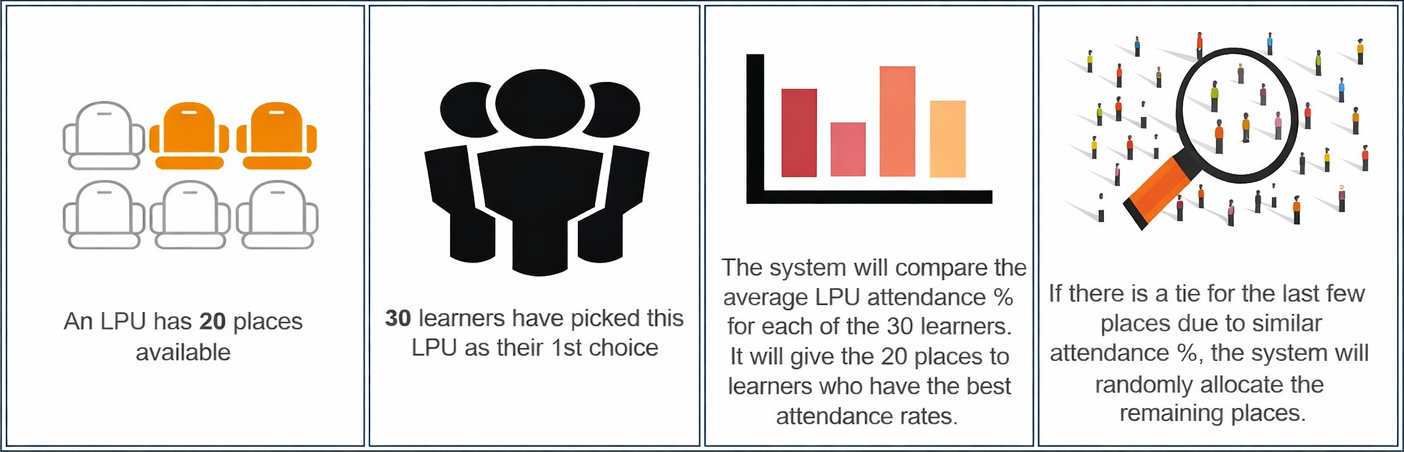
Summary
- Maintain regular attendance of LPU classes
- A healthy attendance rate gives you a higher chance of securing your choice LPU (especially for popular learning units / learning units with limited vacancies)
- Nett LPU attendance % will be considered (you are not penalised for missed lessons due to valid reasons)
For more information on GENESSYS, click here.
| Schools | Date / Time Open | Date / Time Close |
|---|---|---|
All schools (except SHSS students) |
Tuesday, 29 Sep 2026 / 0900 hrs |
Thursday, 1 Oct 2026 / 1000 hrs |
*Important Note:
- All students will pre-select a number of desired elective LPU choices by using GENESSYS (LPU Selection System).
- GENESSYS will review your ranked choices and allocate learning unit/s and time slots to you taking into consideration your choice ranking, time slots, demand and availability of learning unit vacancies.
- You will be able to select learning units offered by other schools or CILS (Centre for Innovation & Life Skills).
- Here are the learning units offered in all 3 groups.
| Group | Learning Units offered by | What you need to choose (total of 12 choices) | Choice Number |
|---|---|---|---|
1 |
2 choices (learning unit/preferred time slots) |
1 to 9 |
|
2 |
4 choices (learning unit/preferred time slots) |
1 to 9 |
|
3 |
3 choices (learning unit/preferred time slots) |
1 to 9 |
|
1 to 3 |
3 choices from any learning unit/preferred time slots |
10 to 12 |
- The first 9 choices (Choice 1 to 9) have to come from Group 1 (2 choices), Group 2 (4 choices) and Group 3 (3 choices) in any order of preference.
- For each choice, you will need to select your preferred learning unit and preferred time slot.
- If you prefer Learning Unit A and it is offered in more than one time slot, you can also select them as separate choices (e.g., Choice 1 = Learning Unit A/Time Slot 1 and Choice 2 = Learning Unit A/Time Slot 2).
- The last 3 choices can be from any learning unit/preferred slots from any of the 3 Groups.
For more information on how to do your selection using GENESSYS, click here.
In the event you experience any difficulty in accessing the NYP network during the selection, please contact your school’s LPU representative or i@Central hotline at 6451 5115.
If you did not select your Elective LPUs during the selection period, GENESSYS will automatically register you into LPUs with available vacancies.
Advice on LPU Selection
- Please take time to review the learning unit description and determine which learning unit/s appeal to your interest.
- When accessing the Student Portal, please ensure you are in a location with good internet access so that you can complete the selection smoothly.
- As some LPU vacancies are limited, it will be good for you to identify a basket of learning units and prioritise your choice during the selection exercise.
- Remember the LPU selection exercise dates and mark it in your calendar. If you miss the selection, you will be assigned to LPU/s with remaining vacancies.
- You will be able to see and select the Elective LPUs offered to your school except those from your own school.
- Each learning unit selection will have the available time slots shown. You will need to indicate your preferred time slots for every choice.
- Once you have selected your 12 choices, please remember to click the “Submit” button and log off from the Student Portal.
- As long as the system is open during the selection period, you may enter to make changes and resubmit your choices.
- If you have any doubts on LPU matters, please speak to your personal mentor, course manager or School LPU representative.
- In the event if any learning unit group is undersubscribed (i.e., too few students to start a class), you may be advised to switch to another learning unit group or be requested to select another available learning unit.
- LPU Selection System (GENESSYS) FAQs
Posting of LPU Allocation
The allocation of LPU/s will be confirmed a week before the semester begins.
Please check and print your timetable to view the LPU/s you have been allocated.
Venues for Elective LPUs
The venue of your LPU lesson will be indicated on your timetable.
Lessons begin in Week 2.
School LPU Staff Contacts
If you have any further enquiry on Elective LPUs, you may wish to contact your course manager or LPU representative.